Table of Contents
- Importance of Loading Indicators
- Types of Loading Indicators
- Best Practices for Implementation
- Impact on User Retention
- Case Studies
- Conclusion
In today’s dynamic mobile landscape, delivering an excellent user experience is a top priority for app designers and developers. Among the many components shaping that experience, the role of the loading indicator is often underestimated. These visual cues keep users informed during wait times and play a pivotal role in minimizing frustration while boosting satisfaction across a wide spectrum of mobile apps.
When users interact with an app, every second of waiting can directly influence how the app is perceived. Well-designed loading indicators communicate ongoing processes in a way that maintains trust and informs users that their actions are being handled. By calmly managing moments of inactivity, loading indicators can turn otherwise negative experiences into opportunities for added engagement.
Without proper feedback, even the briefest loading times can cause impatience and disconnection. However, a thoughtfully chosen loading indicator bridges this gap by providing essential, timely feedback. This subtle interaction detail can transform perceived waiting time, contributing to increased user retention and app success.
Enterprise-level apps and startups alike now pay close attention to how loading states are presented, using them not only as a functional necessity but also as a strategic design decision. This approach elevates the user’s sense of control and helps ensure brand loyalty in highly competitive markets.
Importance of Loading Indicators
Loading indicators are much more than fleeting animations. They set the tone for patience during processes like file uploads, content fetching, or screen transitions. According to usability research, apps that fail to provide such visual cues risk appearing unresponsive, leading to higher abandonment rates. A study published in Nielsen Norman Group highlights that users are more tolerant of waiting when they understand progress and expect outcomes.
It has also been observed that the presence of simple, clear feedback alleviates the uncertainty linked to digital wait times. For consumer-facing apps, a single second’s delay can lead to a noticeable decrease in conversion rates, emphasizing how important even the smallest UX elements are to the success of a product.
Types of Loading Indicators
The right loading indicator should align with both the expected duration and context of the delay. Here are the main types typically found in mobile experiences:
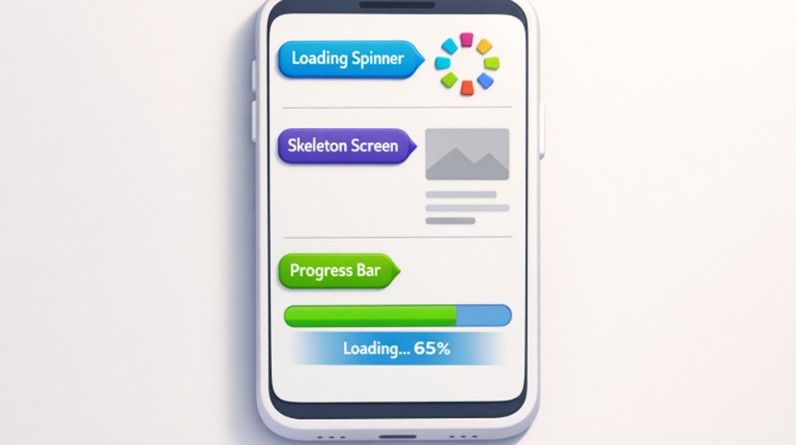
- Spinners:Circular or linear animated graphics that signify ongoing activity. These are most effective for indeterminate, short waiting periods, usually less than 3 seconds.
- Skeleton Screens:Placeholder outlines that preview the shape of forthcoming content. Skeleton screens are ideal for medium-length waits, especially on resource-intensive pages, since they offer a glimpse of the content’s layout and soften the inconvenience of waiting.
- Progress Bars:Linear or circular bars that show a completion percentage. These are suitable when the app can estimate and communicate the duration of a process, reassuring users by setting expectations.
Choosing the best type is a strategic decision, rooted in balancing transparency, functionality, and user expectations. When paired correctly with app processes, these indicators maintain credibility and contribute to a seamless experience.
Best Practices for Implementation
Smart loading indicator deployment is key for performance and UX optimization. The following considerations maximize their effectiveness:
- Match Indicator to Wait Time:Use short, unobtrusive spinners for fast processes, engaging skeleton screens for medium delays, and accurate progress bars for longer or well-defined tasks. This creates consistency and helps set user expectations.
- Provide Accurate, Immediate Feedback:Ensure every loading indicator is visible and directly relevant to user actions. If a process is lengthy, let the progress reflect real status. Avoid showing deceptive or never-ending animations as these erode trust.
- Optimize App Performance:Reduce load times using efficient coding practices, such as lazy loading, asset optimization, and targeting device capabilities. This decreases user exposure to waiting states and minimizes overreliance on loading indicators for UX quality.
For more on optimizing mobile wait times and performance, see the in-depth guidelines from Smashing Magazine.
Impact on User Retention
Effective loading indicators can improve user retention rates considerably. Mobile app users, in particular, expect near-instant feedback; when met with well-implemented visual feedback during loading, they are more likely to remain patient and engaged. Google’s research revealed that a staggering 53% of mobile visits are abandoned if a page takes more than 3 seconds to load, showing the direct link between perceived responsiveness and app abandonment rates.
On the other hand, when users receive timely updates through thoughtfully chosen loading indicators, they are less likely to navigate away from the app. This attention to micro-interactions improves brand reputation and makes it more likely that users return for repeat sessions.
Case Studies
YouTube’s Redesign in 2024
YouTube’s 2024 app update replaced generic loading spinners with a thumbnail preview of videos and a progress bar during loading times. This minor change led users to feel like the app was 25 percent faster, even though actual technical improvements only accounted for an 8 percent reduction in real loading time. It is a striking example of how perception, bolstered through the right visual cues, can be as valuable as backend optimization.
Material 3 Expressive Loading in Android 16
With Android 16, Google’s Material 3 guidelines debuted a new expressive loading state: a lively, wavy animation that adds a sense of anticipation and play. The aim was to turn waiting into a more engaging and positive moment within the app journey. This attention to detail demonstrates how loading indicators are treated not just as placeholders, but as active, branded parts of the overall user experience.
Conclusion
Loading indicators are not just ancillary graphics; they are fundamental to creating lasting, positive interactions in mobile apps. When chosen thoughtfully and implemented with best practices in mind, loading indicators not only inform users but also enhance their entire app journey. As mobile environments continue to prioritize speed and feedback, the strategic use of loading indicators will remain a cornerstone of excellent mobile UX, supporting both user satisfaction and business outcomes.